How to Calculate GPA and CGPA: A Complete Student Guide
Grade Point Average (GPA) and Cumulative Grade Point Average (CGPA) turn many course results into one number. Students calculate them to check their standing, plan a semester, set a graduation target or complete an application. The calculator above does the arithmetic, but knowing how it works helps you catch mistakes and make better decisions.
Two ideas sit behind almost every GPA system. First, each grade is converted into a grade point. Second, each grade point is weighted by the course’s credit units, so a four-credit course counts for more than a one-credit seminar. What differs between institutions is the scale: some use 4.0, some 5.0, some 10.0, and others use percentages or custom bands. Because every institution sets its own grading policy, always use the scale your school publishes. The scales and examples in this guide are illustrations, not official standards.
What Is GPA?
GPA stands for Grade Point Average. It summarizes performance over one defined period, usually a semester, term or academic year. The usual method is credit-weighted: each course produces quality points (grade point × credit units), and the GPA is total quality points divided by total credit units.
For example, on a 5.0 scale an A (5.0) in a three-credit course gives 15 quality points, and a B (4.0) in another three-credit course gives 12. That is 27 quality points over 6 credits, so the GPA is 27 ÷ 6 = 4.50.
What Is CGPA?
CGPA stands for Cumulative Grade Point Average. It combines every course or semester your institution includes, so it describes your whole record to date instead of a single term. It is also credit-weighted: total quality points across all included courses divided by total credit units across them.
This is why simply averaging semester GPAs can be wrong. Suppose Semester 1 has a GPA of 3.00 over 10 credits and Semester 2 has 4.00 over 30 credits. The simple average is 3.50, but the weighted result is (30 + 120) ÷ 40 = 3.75, because the larger semester should count for more.
GPA vs CGPA
| GPA | CGPA | |
|---|---|---|
| Time period | One semester, term or year | Everything included to date |
| What is included | Courses in that period | All included courses across periods |
| How it is calculated | Quality points ÷ credit units for the period | Total quality points ÷ total credit units across all periods |
| Typical use | Semester performance, standing checks | Overall record, graduation, applications |
| Relationship | One input to the CGPA | A credit-weighted blend of every GPA |
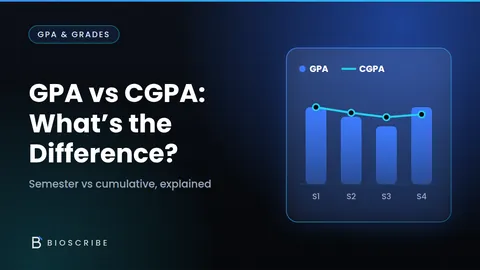
Some institutions call the cumulative figure “cumulative GPA”; the idea is the same. For a shorter comparison, read GPA vs CGPA: What’s the Difference?
The GPA Formula
Quality Points = Grade Point × Credit Units
GPA = Total Quality Points ÷ Total Credit Units
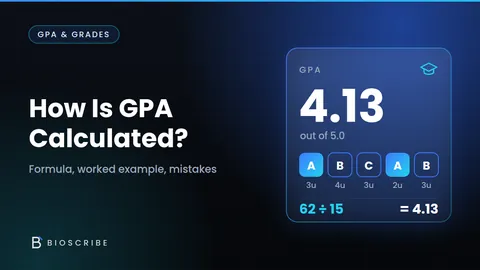
Worked example (a 5.0 scale used only as an illustration): Course A has 3 credits at 5.0, giving 15 quality points. Course B has 3 credits at 4.0, giving 12. Course C has 2 credits at 3.0, giving 6. Total quality points are 33 and total credits are 8, so GPA = 33 ÷ 8 = 4.125. Depending on the rounding rule, that appears as 4.13 (two decimals) or 4.125 (three). For another walkthrough, see How Is GPA Calculated? A Simple Step-by-Step Example.
How to Calculate GPA Step by Step
- List your courses for the period.
- Find each course’s credit units.
- Convert each grade to a grade point using your institution’s scale.
- Multiply each grade point by its credit units to get quality points.
- Add up all the quality points.
- Add up all the credit units that count.
- Divide total quality points by total credit units.
- Round according to your institution’s policy.
Leave out courses your institution excludes, such as zero-credit or withdrawn courses, before you add anything up.
How to Calculate CGPA
CGPA = Total Quality Points Across Included Courses ÷ Total Credit Units Across Included Courses
Earlier semesters contribute through their quality points and credits. If you know your previous CGPA and the credits behind it, multiply them to recover the previous quality points. Example: a previous CGPA of 3.50 over 60 credits is 210 quality points. A current GPA of 4.00 over 20 credits adds 80. Total quality points are 290 over 80 credits, so CGPA = 290 ÷ 80 = 3.625, shown as 3.63 at two decimals.
How to Calculate CGPA From Semester GPAs
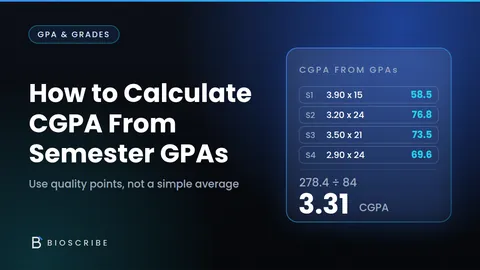
If you only have semester GPAs and credit loads, multiply each GPA by its credits, add the results, then divide by total credits.
- Semester 1: 3.20 × 18 credits = 57.6 quality points
- Semester 2: 3.70 × 20 credits = 74.0
- Semester 3: 4.00 × 19 credits = 76.0
Total quality points are 207.6 over 57 credits, so CGPA = 207.6 ÷ 57 ≈ 3.642 (3.64). A plain average of the three GPAs gives 3.633 (3.63). The gap is small here because the loads are similar, and it grows when they differ. The CGPA mode does this weighting for you, and How to Calculate CGPA From Your Semester GPAs goes further.
How to Calculate Your Target CGPA
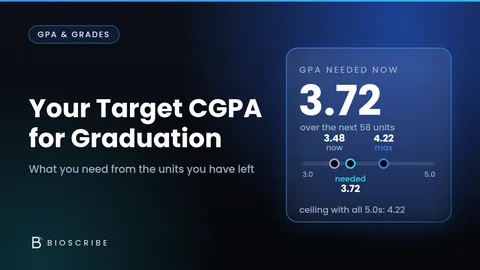
Target mode answers “what GPA do I need next?” You need your current CGPA, completed credits, target CGPA and upcoming credits.
Current Quality Points = Current CGPA × Completed Credits
Required GPA = (Target CGPA × (Completed + Upcoming Credits) − Current Quality Points) ÷ Upcoming Credits
Example on a 5.0 scale: current CGPA 3.20 over 60 credits (192 quality points), target 3.50, 20 upcoming credits. Total credits after the semester are 80, so the target needs 280 quality points. The shortfall is 88 over 20 credits, a required GPA of 4.40.
Now raise the target to 3.70. The target needs 296 quality points, the shortfall is 104, and the required GPA is 104 ÷ 20 = 5.20. That exceeds the 5.0 maximum, so the target is mathematically impossible with 20 credits; the best possible CGPA is (192 + 100) ÷ 80 = 3.65. The calculator reports this clearly instead of returning a nonsensical number. Your options are a lower target or more credits. Try it in Target CGPA mode, or read How to Calculate Your Target CGPA for Graduation.
How Credit Units Affect GPA
In a credit-weighted system, a 4-credit course influences your GPA more than a 1-credit course. Suppose you earn 2.0 in a 4-credit course and 4.0 in a 1-credit course. Averaging the grade points gives 3.0, which ignores credits. The weighted GPA is (2.0 × 4 + 4.0 × 1) ÷ 5 = 12 ÷ 5 = 2.4. That is why grade points should not be averaged directly. If you only need a plain average of numbers, the Average Calculator is the right tool.
What-If GPA Calculations
A what-if calculation tests a grade before it happens. Say Biology (3 credits) is a B, Mathematics (3 credits) is a C and English (2 credits) is a B on a 5.0 scale: (12 + 9 + 8) ÷ 8 = 3.625. If Mathematics improves from C to B, quality points become 12 + 12 + 8 = 32, so the GPA becomes 4.000, a change of +0.375. Open What-If mode to change several grades at once. Results are for planning only and never alter your official record. To find the exam score you need for a course grade, use the Grade Calculator.
Different GPA Scales
A 4.0 scale tops out at 4.0 and often uses plus and minus grades. A 5.0 scale might map A to F onto 5 through 0. A 10-point scale is used elsewhere, and some institutions work from percentages or custom bands. No grade always equals one grade point everywhere: a B can be worth 3.0, 4.0 or 6 depending on the institution. Select the scale your institution publishes, or enter your own in the custom option. If you need to turn raw scores into percentages first, the Percentage Calculator can help.
Common GPA Calculation Mistakes
- Forgetting credit units: without weighting, every course looks equal.
- Treating every course equally: a plain average of grade points distorts the result.
- Averaging semester GPAs incorrectly: multiply each GPA by its credits first.
- Using the wrong grading scale: a 4.0-scale point value means something different on a 5.0 scale.
- Including excluded courses: withdrawn, audit or non-credit courses may not count.
- Rounding too early: round only the final result.
- Confusing GPA with CGPA: one covers a period, the other your whole record.
- Assuming repeat-course policies are universal: some institutions replace the old grade, others count both.
- Ignoring pass/fail rules: such courses may be left out of GPA, or a fail may count as zero.
GPA Rounding
Institutions may display GPA to two decimals, three decimals or another convention. Rounding intermediate values introduces error: if a true semester GPA is 3.6667 and you round it to 3.67 before weighting it across 60 credits, you add 0.2 quality points that do not exist. The calculator keeps full precision internally and rounds only the displayed result; you can choose two or three decimals. If your institution truncates instead of rounding, follow its rule.
Can I Raise My CGPA?
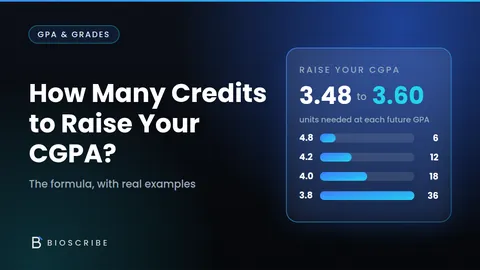
New CGPA = (current quality points + future quality points) ÷ (completed credits + future credits). The more credits you have completed, the less one semester can move the number. Take a student with a 3.00 CGPA who earns a perfect 4.0 over 15 new credits on a 4.0 scale. After 30 completed credits, the CGPA rises to (90 + 60) ÷ 45 = 3.33. After 90 completed credits, it rises only to (270 + 60) ÷ 105 ≈ 3.14. Early semesters carry the most leverage, but later improvements still count, and Target mode shows exactly what you need. To organize the time for it, try the Study Schedule Generator and Exam Countdown, and read How Many Credits Do You Need to Raise Your CGPA?
Important Institutional Differences
Institutions can differ in grading scales, credit systems, rounding, repeated courses, withdrawals, pass/fail courses, incomplete grades and transfer credits. Verify your school’s official academic regulations, student portal or adviser before relying on any number for decisions about scholarships, probation or graduation. BioScribe results are calculations, not official records. See the Disclaimer.