How to Calculate Your Grade: A Complete Student Guide
A grade can mean several different things, and mixing them up is the most common source of confusion. The calculator above handles simple scores, weighted courses and final-exam targets. This guide explains the arithmetic so you can check any result yourself. Grading policies differ between institutions and even between courses, so treat every example here as an illustration and your syllabus as the authority.
What Is a Grade?
A grade summarizes how well you performed, but it can be expressed in four ways. A raw score is the points you earned, such as 43 out of 60. A percentage rescales that score to 100, so 43 out of 60 is 71.67%. A letter grade such as B is a label attached to a range of percentages. A weighted course grade combines every assessment in a course according to how much each one counts.
Systems vary. Some schools report percentages only, some use letters, and some use descriptive bands or point totals. The same percentage can earn different letters at different institutions, which is why BioScribe lets you define your own boundaries.
How to Calculate a Simple Grade
Percentage = (Points Earned ÷ Total Points) × 100
If you scored 45 out of 60, the percentage is 45 ÷ 60 × 100 = 75%. That means you earned three quarters of the available marks on that assessment. It says nothing yet about your course grade, which depends on how much the assessment counts. Try your own numbers in the Simple Grade mode.
How to Calculate a Weighted Grade
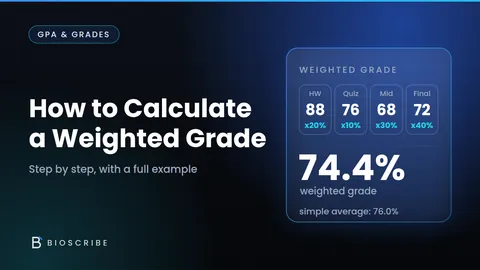
Most courses weight assessments differently. Convert each score to a percentage, then multiply by its weight written as a decimal.
Weighted contribution = Assessment percentage × Assessment weight
Suppose assignments score 85% with a 20% weight, the midterm scores 72% with a 30% weight, and the final scores 90% with a 50% weight. The contributions are 85 × 0.20 = 17, 72 × 0.30 = 21.6 and 90 × 0.50 = 45. Add them: 17 + 21.6 + 45 = 83.6%. The weights total 100%, so 83.6% is the course grade. For more depth, see How to Calculate a Weighted Grade or What Is a Weighted Grade and How Does It Work?
Why Weighting Matters
Weight decides how far one result can move your course grade. A final exam worth 50% affects the outcome far more than a quiz worth 5%. If you score 40 percentage points higher on the quiz, your course grade rises by 40 × 0.05 = 2 points. The same improvement on the final raises it by 40 × 0.50 = 20 points. Two assessments with identical percentages can therefore matter very differently.
How to Calculate Your Current Grade
Before a course ends, there are two different numbers, and they answer different questions. The average on completed work shows how well you have done on what has been marked. The contribution so far shows how many points of the final 100% you have already earned.
Example: an assignment scored 90% with a 20% weight and the midterm scored 80% with a 30% weight. The final, worth 50%, is not done. Contributions are 18 and 24, so the contribution so far is 42 points. Completed weight is 50%, so the average on completed work is 42 ÷ 50 × 100 = 84%. Telling someone “I have an 84%” can mislead, because only half the course is graded. The Weighted Grade mode shows both numbers and keeps them separate.
How to Calculate the Grade You Need on Your Final Exam
Current Contribution = Current Average × Completed Weight
Required Final Score = (Target Grade − Current Contribution) ÷ Final Exam Weight
Example: your average is 74% on 60% of the course, the final is worth 40%, and you want 80% overall. Current contribution = 74 × 0.60 = 44.4. Required final = (80 − 44.4) ÷ 0.40 = 35.6 ÷ 0.40 = 89%. You would need about 89% on the final.
The result is a score on the final exam itself, not on the whole course. If other assessments are still to come, treat them together as the “remaining weight” or use weighted mode. You can run this calculation in Required Final Score mode, and How Much Do You Need on Your Final Exam to Pass? covers the pass-mark version.
Is Your Target Grade Possible?
Compare the required score with the limits of a percentage scale.
- Required score of 100% or less: potentially achievable, depending on how hard the remaining work is.
- Required score above 100%: mathematically impossible under the stated assumptions.
- Required score of 0% or less: already secured, because even a zero would not drop you below the target.
Example: with a 50% average on 60% of the course and a 40% final, a 95% target needs (95 − 30) ÷ 0.40 = 162.5%, which is impossible. With a 90% average on 80% of the course, a 70% target needs (70 − 72) ÷ 0.20 = −10%, so it is secure. Real institutions may add conditions such as minimum exam marks, so these results describe the arithmetic only.
What If Your Target Is Too High?
When a target needs more than 100%, the useful number is the highest possible final grade: current contribution plus the full remaining weight. Say your contribution is 45 points and 40% of the course remains. Even a perfect 100% on the remaining work adds 40 points, so the maximum is 45 + 40 = 85%. A 90% target is therefore impossible, while anything up to 85% is still in reach. The calculator shows this figure automatically and also lists nearby targets in a small scenario table.
Weighted Grades When Scores Have Different Totals
A score of 80 out of 100 and a score of 16 out of 20 are both 80%. Once you have percentages, the totals no longer matter. Only the weights do. The mistake is adding raw points across assessments with different weights.
Example: homework scored 90 out of 100 with a 40% weight, and an exam scored 30 out of 40 with a 60% weight. Adding raw points gives 120 ÷ 140 = 85.7%, which is wrong. Weighting gives 90 × 0.40 + 75 × 0.60 = 36 + 45 = 81%. The exam has fewer points but counts more, so it pulls the result down.
Letter Grades and Grade Boundaries
A percentage does not correspond to one letter everywhere. One school may award an A from 70%, another from 80% or 90%, and some use plus and minus grades or no letters at all. Convert only after you know your institution’s boundaries. In BioScribe, choose Use custom grade scale, enter each grade with its minimum percentage and optional maximum, and the calculator assigns the highest grade whose minimum your percentage meets. It checks for duplicate minimums and overlapping ranges, and it applies the boundaries to the unrounded percentage.
How to Calculate a Category Average
Many syllabi give one weight to a whole category, such as “assignments: 20%”. You then need a single percentage for the category first. If every assignment counts equally, average the percentages. If marks are pooled, add all earned points and divide by all possible points. Scores of 8/10, 18/20 and 27/30 give 53 ÷ 60 × 100 = 88.33% pooled, but an equal-weight average of 80%, 90% and 90% gives 86.67%. The methods differ, so follow your syllabus. Then multiply the category percentage by the category weight: 88.33 × 0.20 = 17.67 points. Enter the category as one row. If the lowest score is dropped, remove it before averaging.
Common Grade Calculation Mistakes
- Forgetting assessment weights: a plain average treats every assessment equally.
- Treating every assignment equally: weights exist because assessments differ in importance.
- Confusing current average with final course grade: an 84% average on half the course is not an 84% course grade.
- Using raw points when assessments are weighted: convert to percentages first.
- Adding percentages without weights: 80% plus 90% is not 170% of anything.
- Rounding too early: round only the final figure.
- Using the wrong grading boundaries: a B at one school can be a C at another.
- Forgetting incomplete assessments: leave them blank rather than entering zero.
- Entering incorrect total points: a wrong total changes the percentage.
- Assuming your institution uses another school’s rules: always check your own.
Using the What-If Feature
A what-if tests a score before it happens. In Weighted Grade mode, switch on Try What-If and type a what-if percentage for any assessment, finished or not. The calculator recomputes straight away and shows your average on completed work and your contribution before and after. If your 72% midterm (weight 30%) had been 82%, the contribution would rise by 10 × 0.30 = 3 points. What-if numbers are for planning only and never change a record.
How to Improve Your Final Grade
Improvement is arithmetic before it is effort. Each percentage point on an assessment worth w% adds w ÷ 100 points to your course grade. Ten extra points on a 40% final add 4 points, while the same gain on a 10% project adds 1. List the remaining assessments, rank them by weight, and use Required Final Score mode with several targets to see what each one demands. Then decide where time pays off most. The Study Schedule Generator can turn that priority list into a plan, and Exam Countdown shows how long you have.
Grade Calculator Example
Here is a complete example from start to finish. Assignment 1 scored 85% with a 10% weight, Assignment 2 scored 90% with a 10% weight, the midterm scored 72% with a 30% weight, and the final scored 88% with a 50% weight.
- Assignment 1: 85 × 0.10 = 8.5
- Assignment 2: 90 × 0.10 = 9
- Midterm: 72 × 0.30 = 21.6
- Final: 88 × 0.50 = 44
The sum is 8.5 + 9 + 21.6 + 44 = 83.1%. In Weighted Grade mode you enter each score out of 100 with its weight. The calculator converts every score to a percentage, multiplies by the weight, adds the contributions, and reports 83.1% with no remaining weight.
Understanding Your Course Syllabus
The syllabus defines the real rules, and the calculator only reproduces the arithmetic. Check these items before relying on any result:
- Assessment weights and categories
- Grade boundaries
- Extra credit
- Drop policies, such as dropping the lowest quiz
- Replacement or resit exams
- Rounding rules
- Attendance requirements
- Institutional grading policies
If a policy changes the weights or removes an assessment, enter the adjusted values. When in doubt, ask your instructor.